Documentation Hub
Answers and step-by-step guides explaining WorshipFlow AI's core capabilities.
Founding Member Pilot Program
What is the Founding Member Pilot Program?
WorshipFlow AI is launching an early adopter pilot program for our first 10 production churches. In exchange for your valuable feedback, founding members get full, unrestricted access to the **Premium Tier** features for the price of the **Basic Tier (£12/month)** for their first 6 months.
How do I redeem the pilot discount?
Simply select the **Premium plan** on the subscription pricing page, click the subscribe button, and apply the promo code FOUNDERPILOT at the Stripe Checkout screen. This will apply a flat monthly discount of £47 off the Premium Plan for 6 months.
What feedback is expected from pilot churches?
To help refine WorshipFlow AI, we request that you fill out a brief monthly 3-question survey. Your feedback on sermon matching relevance, ease of PCO sync, and volunteer roster management directly informs our development roadmap.
Plan Flexibility & Management
Can I upgrade, downgrade, or cancel my plan at any time?
Yes, absolutely. By clicking on your profile / billing section, you can enter the secure Stripe Billing Portal. From there, you can view your current plan, upgrade to standard/premium, downgrade to a lower tier, or cancel your subscription instantly. Upgrades and downgrades adjust your active volunteer limit in Firestore in real time.
What happens if I cancel my subscription?
If you cancel, your active subscription remains valid until the end of your current billing period. Once the period ends, your account falls back to the restricted/expired status, prompting you to reactivate if you wish to run the automated theme matching and rehearsal briefs.
Free Trial Specifications
What is included in the 14-day Free Trial?
The 14-day Free Trial grants you full access to our **Standard Tier** capabilities, including custom Vocal & Band Rehearsal Briefs and a volunteer capacity of up to 150 Planning Center Online (PCO) active volunteer records.
Do I need a credit card to start the trial?
No credit card is required. You can authenticate using Planning Center Online OAuth 2.0 and begin staging repertoire immediately. You will only be asked to configure payment if you decide to upgrade or continue past the 14-day period.
Local Firestore History Details
What data is stored in my local database collection?
We store:
1. Staged volunteer details (Name, Email, Role, Voice Classification).
2. Song catalog metadata inferred by Gemini (Artist, default Key, BPM, Themes, Vocal Range).
3. Uploaded sermon text drafts and the generated setlists.
How long is my historical planning data kept?
Your historical data is retained indefinitely in secure Google Cloud Firestore structures as long as your account remains open, enabling historical sermon matching trends. You can clear your song library or remove specific entries instantly via the bulk action controls on the dashboard.
How does historical data benefit my worship planning?
By tracking which songs have been played recently and matching them against the sermon theme, the Gemini engine avoids recommending the same tracks in consecutive weeks. This helps keep your congregational repertoire fresh while remaining highly aligned with the pastor's message.
Compliance Licensing & CCLI Advice
What does the "compliance licensing advice" entail?
For each suggested song, the Gemini engine verifies if the title is commonly covered under the standard CCLI (Christian Copyright Licensing International) streaming rules, or if it is in the Public Domain (meaning no licensing fees or streaming reports are required). This is shown on your dashboard and injected directly into the rehearsal briefings.
Does the software automatically report songs to CCLI?
No, WorshipFlow AI does not directly report song logs to CCLI (Christian Copyright Licensing International), as CCLI does not provide public endpoints for automatic reporting. Instead, we flag which songs require manual streaming reporting in your admin cycle to ensure you remain fully compliant and save you legal research time.
Volunteer Roster & Vocal Transpositions
How does the Volunteer Roster integrate with Planning Center?
WorshipFlow AI links your Firestore volunteer roster directly with Planning Center Online Services. When a sermon is submitted for analysis, the app calls PCO to fetch the scheduled team members (specifically looking for lead singers/vocalists) and matches their names against your local roster database to identify their exact voice classifications.
How does vocal transposition key matching work?
Once the Lead Vocalist's voice classification (Soprano, Alto, Tenor, Bass) is identified, it is supplied as real-time context to the Gemini AI engine. If a recommended song's default key lies outside their comfortable range (e.g., a Soprano key recommended for an Alto singer), Gemini automatically calculates and recommends the ideal transposed key along with transposition offset notes.
Spiritual Resources Hub
How are the devotionals and icebreakers generated?
The Spiritual Resources Hub fetches metadata from the upcoming PCO plan—including the liturgical day, lectionary scripture readings, band instruments, and scheduled team members. It combines this with your weekly prayer focus or sermon theme, and requests Gemini to compose a structured, three-sentence team devotional and three rehearsal reflection questions customized to that Sunday's service.
Which liturgical traditions are supported for calendar lookups?
We support multiple traditions, including the Church of England (Common Worship) and the Revised Common Lectionary (RCL). Gemini parses the calendar date, identifies the liturgical season, designation, standard color, and readings, and applies them to contextualize the spiritual materials.
Multi-Site & Premium Operations
What is Multi-Site Organization Support and how does it work?
For larger multi-campus churches, Multi-Site support links multiple campus locations under a single primary billing tenant. Each campus connects to its own Planning Center Online (PCO) instance. While calendars and song catalogs can be synced centrally to maintain organizational alignment, volunteer lists, vocal ranges, and local transpositions are securely isolated per campus. Background syncing keeps all your sites aligned automatically.
What is Priority Queue & Dedicated Support?
Our Priority Queue routes your sermon analyses, setlist queries, and resource generations to a dedicated, high-performance Cloud Tasks queue. This ensures instant execution during busy weekend preparation windows. In addition, you get access to a dedicated support email that filters directly into a priority dashboard, guaranteeing a 24-hour response window for any urgent issues.
Planning Center Online OAuth Integration
Learn how WorshipFlow AI integrates safely with your existing church administration system.
OAuth 2.0 Handshake
When you click "Log In" or "Sign Up", you are redirected to the secure Planning Center Online authentication screen. No passwords are shared with or stored by WorshipFlow AI.
Permissions Requested
We request access to `people` (to retrieve scheduled rosters for transpositions) and `services` (to read your library catalog and commit approved weekly setlists).
Token Lifecycle
Your access token is stored securely in Firestore and updated using standard refresh token rotation algorithms. If you revoke access in PCO, your local tokens are deleted immediately.
Volunteer Data Policy: WorshipFlow AI retrieves volunteer rosters solely to calculate optimal musical keys based on scheduled singers. We never transfer volunteer names or emails to third parties, nor do we pass them to the Gemini API.
Match Recommendation Dashboard
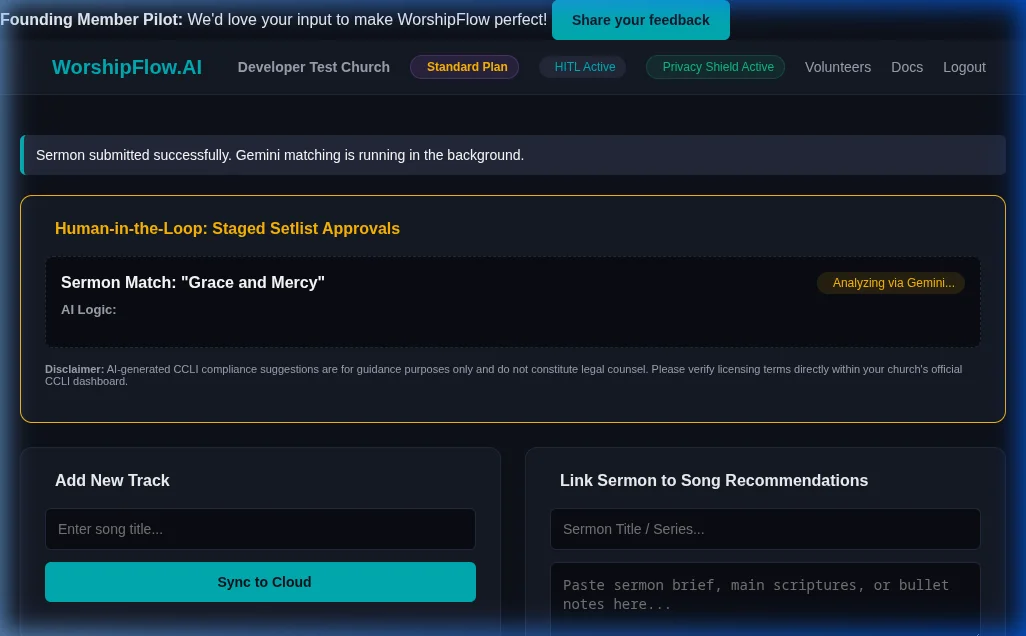
Once logged in, WorshipFlow AI auto-matches upcoming sermons with your local repertoire library:
Pre-Staging CSV Verification
Follow these steps to clean and migrate existing song libraries from spreadsheets or databases.
Prepare Your CSV File
Ensure your spreadsheet has columns titled **Title** and **Artist** (or Author). Save the file in standard UTF-8 format.
Stage Your Library
Upload the file under "Bulk Migrate Repertoire" on the dashboard. Our analyzer scans the records and alerts you of duplicates or formatting warnings (e.g. leading numbers, BOM indicators).
Inline Editing & Auto-Clean
You can edit any title or artist directly inside the textboxes. Click the Auto-Clean Titles & Artists button to automatically strip numbers (e.g. "01. "), bullet points, and special symbols.
Final Import
Uncheck duplicate or empty rows, and click **Stage Selected Songs** to finalize ingestion. The Gemini API begins analyzing key and BPM structures in the background.
Multilingual Character Set Protection: The Auto-Clean utility uses smart cleaning expressions that safely handle special characters, accents, and non-English alphabets (Cyrillic, Asian scripts, Hebrew, etc.), ensuring your international library imports remain accurate.
Worship Team Directory & Limits
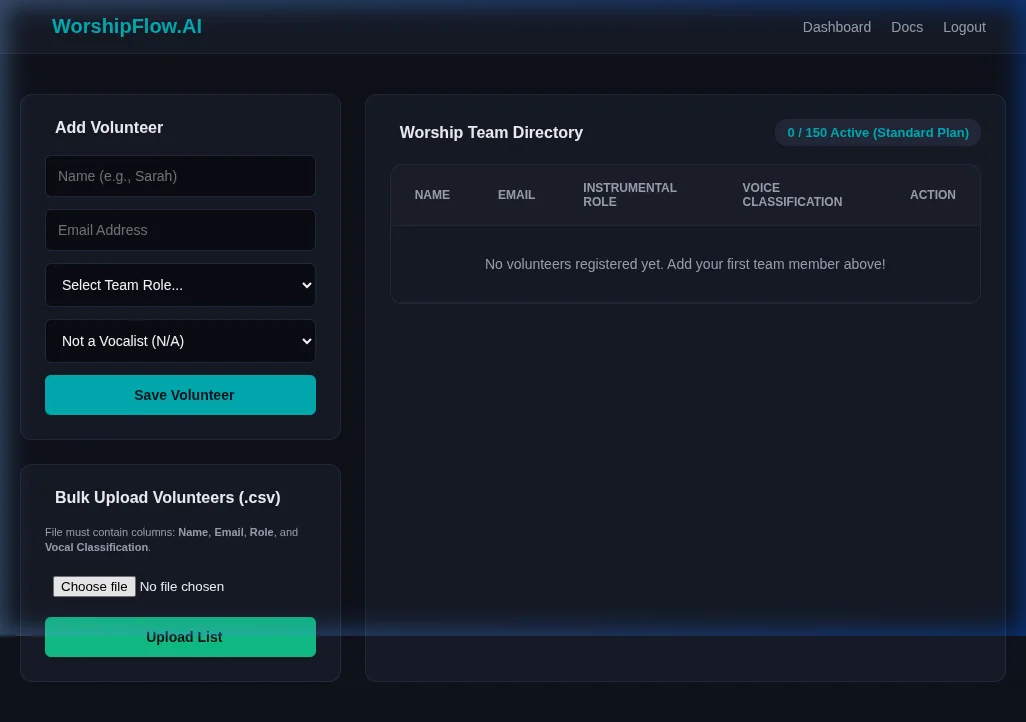
Manage your active volunteer directory, and monitor plan capacity boundaries on your active roster:
How-To: Use Volunteer Vocal Transpositions
Ensure your scheduled vocalists get song keys tailored to their vocal range automatically.
Populate Vocal Classifications
Go to the **Volunteers** tab. When adding singers, ensure you specify their voice classifications (Soprano, Alto, Tenor, or Bass) rather than selecting 'Not Applicable'.
Schedule in Planning Center
In Planning Center Online, schedule your worship team members for the upcoming service. Ensure the vocalist's name matches their name in your WorshipFlow directory, and their scheduled team position contains the word "Vocal", "Singer", "Leader", "Soprano", "Alto", "Tenor", or "Bass".
Analyze Upcoming Sermon
Paste the upcoming sermon outline or text on the home page and run the match. WorshipFlow AI will automatically pull the upcoming PCO plan, identify the scheduled lead singer, retrieve their vocal range, and recommend the best matching songs from your catalog transposed to their optimal key.
How-To: Run the Spiritual Resources Hub
Generate liturgical details, encouraging team devotionals, and icebreaker questions for rehearsal.
Select Date and Liturgical Tradition
Navigate to the **Spiritual Resources** tab. Select the date of your upcoming service and select your church tradition (e.g., Church of England (Common Worship) or RCL).
Fetch Liturgical Metadata
The system queries Gemini to fetch the correct liturgical season, standard liturgical colors, lectionary readings, and the official Collect of the day.
Input Theme & Generate Materials
Provide a brief weekly prayer focus, theme, or sermon title. Click **Generate Devotional** to receive a structured 3-sentence briefing, or **Generate Rehearsal Icebreakers** to receive 3 targeted questions built contextually around your readings and scheduled band instruments.
How-To: Manage Multi-Site Congregations & Priority Channels
Set up unified multi-campus structures and connect with priority support resources.
Create Sub-Tenant Campus Profiles
Under your Organization Settings, create separate profiles for each of your campuses. These sub-tenants will fall under your single billing parent account.
Link Campus Planning Center Accounts
For each campus profile, select "Connect Planning Center" and authorize the respective campus's PCO account. The background sync will automatically partition catalog metadata and rosters accordingly.
Set Up Consolidated Billing
Manage subscription seats centrally in your Billing Portal. A single monthly Stripe invoice will cover all active volunteers and planning actions across all linked locations.